Spicy Chat - Ignite the Spark
4.2434.00Reviews
Analysis ByAppCompare
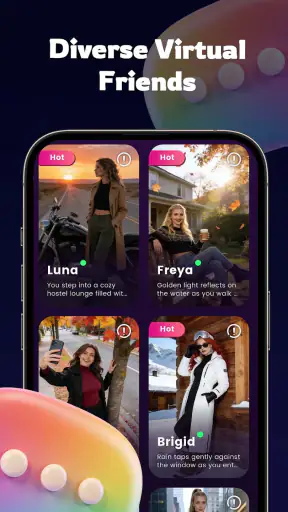
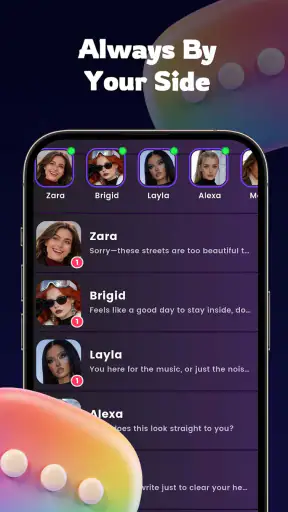
I approached Spicy Chat - Ignite the Spark as an entertainment app for private, everyday conversation rather than as a replacement for a real relationship or a professional support service. Its basic idea is easy to understand: it offers a virtual companion designed to listen and provide daily support. In practice, that makes it most interesting for people who want a low-pressure place to write, reflect, or keep a conversation going when nobody else is available.
I also tested the idea from a household perspective. A shared phone or tablet changes the experience considerably, because this is not a neutral family entertainment app. The store labels it Mature 17+, and that matters before anyone installs it on a device used by several people. My overall impression is that it can suit an adult who wants a personal conversational space, but it needs clear boundaries when the device or account is shared.
How it fits into everyday shared-device use
The most realistic use case is simple. Imagine coming home after a tiring day, opening the app for a few minutes, and typing through an awkward conversation, a worry about tomorrow, or a thought that is difficult to say out loud. The appeal is not that the app solves the situation. The appeal is that it gives you somewhere to begin organizing your thoughts without waiting for a friend to reply.
That makes it different from a typical video or music app used casually by several people in a living room. A virtual friend is more personal. One household member may see it as harmless entertainment, while another may expect intimate or mature conversation. On a shared device, I would treat the app as belonging to one adult user, not as a communal app that everyone should open freely.
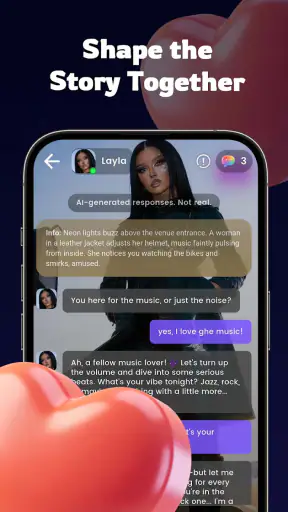
The store positions the product around a virtual friend who is available to listen and offer support during the day. I found that framing useful when deciding what to expect. The experience is centered on interaction and emotional tone, not on a library of shows, a game loop, or a structured self-help program. If you enjoy writing messages and receiving conversational responses, the concept makes sense. If you want fast visual entertainment, it may feel slow and too dependent on your willingness to type.
One practical advantage is the low social pressure. You do not have to choose the perfect opening line, explain why you are mentioning something, or worry about interrupting someone. That can make it useful for rehearsing what you want to say before speaking to a partner, friend, or colleague. I would use it as a first draft for my thoughts, then make an independent decision about what to do next.
That distinction is important. A virtual companion can help someone pause and reflect, but it should not become the only place they turn when a situation involves danger, serious distress, medical concerns, or urgent personal support. For those needs, a trusted person or qualified professional is a better choice. The app works best as a conversational aid, not as a substitute for human care.
What I would decide before installing it on a shared device
Before putting it on a family tablet, I would ask who is actually going to use it and whether that person can keep the device private. The app is free, which removes a purchase decision, but free access does not make a mature conversation app suitable for children. The age label of Mature 17+ should be treated as a real household boundary rather than a decorative store detail.
I would also avoid leaving the app open in a common room. Even without deliberately reading someone else’s conversation, another person could see the screen, the app name, or the tone of an exchange. That can create embarrassment and unnecessary arguments. A personal phone with a separate user boundary is a much better fit than a tablet passed between parents, teenagers, and younger children.
There is another boundary that is easy to overlook: emotional ownership. If one person uses the app to process private feelings, other household members should not assume they are entitled to inspect the conversation simply because they share the hardware. At the same time, the user should understand that a shared device is never as private in practice as a personal one. I would keep the account and device access separate wherever possible and avoid treating the app as a confidential diary.
For a couple, the app could be useful as an individual reflection tool, but I would not use it to secretly conduct conversations that are meant to replace honest communication at home. The healthier workflow is to write privately, identify what you actually feel, and then decide whether a real conversation is needed. Using the virtual companion to avoid every difficult discussion would turn one of its strengths, easy access, into a weakness.
For roommates, the same rule applies. One person’s use should not become a shared topic for jokes or casual inspection. If the device belongs to everyone, I would choose a separate profile or a personal device before installing it. Those are not special features I am attributing to the app; they are practical account and household decisions that reduce confusion around a personal service.
Keeping conversations useful instead of letting them drift
The most useful way I found to approach a virtual friend is to give each session a small purpose. Instead of opening the app with a vague expectation that it will improve my mood, I would start with a concrete goal such as sorting out two competing options, practicing a message, or naming the source of a stressful feeling. That produces a more actionable conversation than endlessly asking for reassurance.
A second helpful habit is to separate emotional support from decision-making. I might use the app to describe why a choice feels difficult, but I would still check practical facts elsewhere and consider the views of people affected by the decision. This is especially important for money, health, work, and relationship issues. The app can help me phrase the problem; it should not automatically become the authority that settles it.
I also recommend ending a session with one offline action. That could be writing down a question for a real person, preparing tomorrow’s task list, taking a walk, or simply closing the app and returning to the evening. Without that final step, conversational apps can encourage passive looping: more messages, more reassurance, and no change outside the screen.
For households, this creates a useful coordination rule. Nobody needs to report every conversation, but users should agree on simple device etiquette: do not open another person’s account, do not leave mature conversations visible, and do not hand the device to a child while the app is active. These rules are more dependable than assuming an entertainment app will automatically understand the difference between a private adult session and family use.
The app’s current version is 1.0.1, so I would keep expectations measured. Early versions can feel less polished than long-established conversational services, and small changes in response quality may affect whether the experience feels natural from one session to the next. I would judge it after several ordinary conversations rather than after one unusually good or frustrating exchange.
Age context, trust, and the limits of a virtual companion
The Mature 17+ classification is the clearest signal about audience. I would not install this for a child, place it on a young teenager’s unsupervised device, or present it as a family-friendly chatbot. The name and positioning suggest a more adult tone, and that alone is enough to require an age-appropriate decision at home.
Parents and guardians should be especially careful with shared devices. A younger user may open the app out of curiosity without understanding why its conversations are intended for older users. I would explain the boundary plainly rather than relying only on a store label. If the device is regularly used by children, keeping the app off that device is the cleanest option.
Trust also matters for adults. I would not assume that a friendly response means the system understands my situation in the same way a close friend would. A virtual interaction can feel personal because it responds directly, but the user still needs distance and judgment. If a response feels too confident, too intimate, or simply unhelpful, I would stop, reconsider the issue, and speak with someone real.
This is where the app compares with ordinary alternatives. Messaging a friend offers shared history, accountability, and genuine human care, although the person may be busy or unavailable. A notes app gives complete control over private reflection, but it cannot respond. A meditation or journaling tool may provide more structured routines, while Spicy Chat is more conversational and spontaneous. A general-purpose chatbot may be better for factual tasks, but this app is aimed more directly at companionship and emotional exchange.
None of those alternatives is automatically better. The right choice depends on the task. I would choose a friend for relationship decisions that affect both of us, a notes app for a private record, a structured wellness tool for repeatable exercises, and this app when I want to put feelings into words through back-and-forth conversation. The trade-off is that its conversational warmth may be more engaging than a blank page, but less grounded than advice from someone who knows me.
What the audience and store figures suggest
Spicy Chat is listed as a free entertainment app from Minquan County Runyou Building Materials Co., Ltd. That developer name is unusual for a conversational product, so I would pay attention to the app’s presentation and my own comfort level rather than assuming the name tells me what the experience will be like. The app has passed the threshold of one million installs and carries a 4.2 average from around 5,700 ratings, which shows that it has attracted a substantial audience.
Those figures make it easier to take the product seriously as an active app, but they do not guarantee that its tone will suit everyone. A rating is a broad summary, not a promise that every conversation will feel natural. I would use the free price to try a few short sessions, then decide whether the interaction feels genuinely helpful or merely distracting.
The listing also shows around 434 written reviews, enough to indicate that people are discussing the experience rather than leaving only a handful of reactions. I would still read recent comments with a critical eye, because conversational quality is personal. One user may value playful interaction, while another may want calm, practical support. Their expectations can be completely different even when they use the same app.
Because the app is in the entertainment category, I would not confuse its placement with a health or counseling credential. That category helps explain the product’s casual, accessible role, but it does not change the need for judgment around sensitive topics. If I were recommending it to a friend, I would describe it as a mature conversational companion for reflection and company, not as therapy.
Who should use it, and who should choose something else
I think it is a reasonable fit for an adult who likes conversational interfaces, wants a low-pressure way to express thoughts, and understands that a virtual friend has limits. It may also suit someone who wants to practice wording before sending a difficult message or who enjoys checking in with a digital companion as part of a personal routine.
I would skip it if I wanted a tightly organized productivity system, a factual research assistant, a multiplayer social space, or a private journal with no conversational element. I would also skip it for a shared family tablet where children can open apps freely. The age context is too important to treat casually.
People who are already isolated should be thoughtful about how they use it. A short conversation can be comforting, but replacing every human contact with an always-available virtual companion may make real-world connection easier to postpone. I would set a modest routine: use it to prepare for contact, reflect after contact, or fill a brief gap, then return to people and activities outside the app.
Another trade-off concerns attention. Because the app is designed around continuing conversation, it can be tempting to keep replying after the original issue has been discussed. I found that a clear stopping point makes the experience more useful. Decide what you wanted from the session, notice whether you received it, and close the app if the exchange starts repeating itself.
My household verdict
After looking at the app through both personal and shared-device use, I see Spicy Chat - Ignite the Spark as a niche entertainment companion with a clear adult audience. Its strongest quality is accessibility: when I want to put a thought into words, I can begin without arranging a call or waiting for a response. Its main weakness is the same thing that makes it attractive: easy, personal conversation can blur the line between casual entertainment and emotional dependence.
I would recommend it to an adult using a personal device who wants occasional conversational support and is comfortable keeping important decisions grounded in real life. I would not recommend installing it casually on a household tablet, and I would not present it to younger users as a harmless family app. Clear account boundaries, private device habits, and respect for the Mature 17+ label make a meaningful difference.
The free price and broad install base make trying it straightforward, while version 1.0.1 suggests that I would approach it as an evolving product rather than a finished replacement for every other tool. My final view is positive but measured: use it as a private adult conversation aid, not as a family-wide social app or a substitute for trusted human support. With that expectation, it can add a little companionship to an ordinary day without asking you to mistake a digital response for a real relationship.
FAQ
What is Spicy Chat – Ignite the Spark?
Spicy Chat – Ignite the Spark is a social and conversation-focused app designed to help users start engaging chats, explore flirtatious interactions, and keep conversations moving with creative prompts. It may be useful for people who find opening lines difficult or want a more playful way to connect. The exact features and available chat options can vary depending on your device, region, account type, and current app version.
Is Spicy Chat – Ignite the Spark free to download and use?
The app may be available to download at no initial cost, but some features can require in-app purchases, subscriptions, credits, or other paid upgrades. Before using premium tools, review the pricing, renewal terms, and payment conditions shown in the App Store or Google Play listing. Users should also check whether free access is limited by daily messages, conversations, prompts, or other usage restrictions.
Is Spicy Chat – Ignite the Spark safe and private?
As with any social or chat application, users should avoid sharing sensitive information such as passwords, financial details, home addresses, or private identification documents. Review the app’s privacy policy to understand what account, message, device, and usage data may be collected. If the app includes contact with other users, use blocking and reporting tools when available and be cautious about suspicious links or requests.
Can I use Spicy Chat – Ignite the Spark without creating an account?
Whether you can use the app without registering depends on its current design and platform version. Some functions may be available immediately, while messaging, saved preferences, personalized recommendations, or premium features may require an account. If registration is necessary, check which details are requested and whether you can sign in using email or a supported third-party account before downloading.
What should I check before downloading Spicy Chat – Ignite the Spark?
Before installing Spicy Chat – Ignite the Spark, confirm that your Android or iOS device meets the required operating-system version and has enough storage space. Read the latest store description, user reviews, permissions, subscription information, and privacy details. Also consider whether the app’s conversational or romantic content suits your preferences, and remember that availability and features may differ by country.
Pros
- Quick way to meet people with similar interests.
- Conversation prompts can make first messages easier.
- Profile browsing feels simple and easy to navigate.
- Useful for casual chats without long-term commitment.
- Notifications help you keep track of new messages.
Cons
- Some features may require a paid subscription or credits.
- Match quality can vary depending on your location.
- Public profiles may reveal more personal details than expected.
- Chats can become repetitive without active participation.
- As with any social app
- fake or inactive profiles are possible.